
PreparingArtwork.md 2.2 KB
Preparing and importing artwork
To animate a character with the 2D Animation package, it is recommended to separate the individual parts of your character onto different Layers in Photoshop (see Example 1). The PSD Importer imports the graphic data from each Photoshop Layer as Sprites, and automatically arranges the Sprites into both a Sprite Sheet, and a Prefab with the Sprites in the Layers’ original positions (see Example 2).
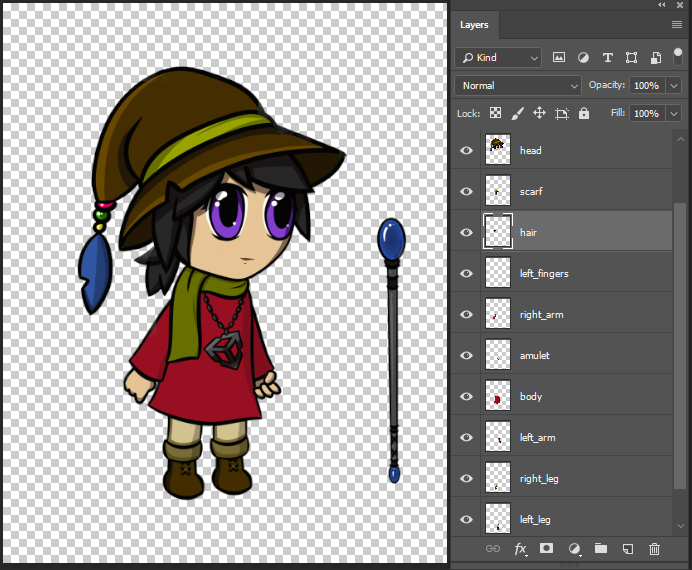
Example 1: Layered character artwork in Adobe Photoshop.
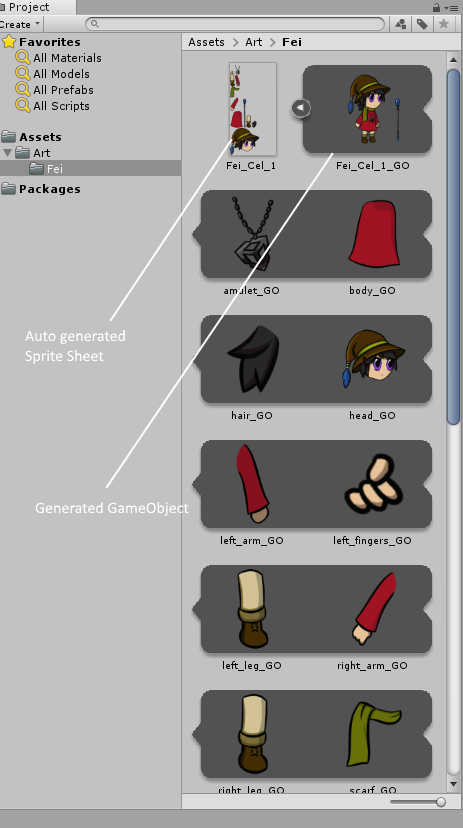
Example 2: The different parts/Layers of the character arranged into a Sprite Sheet.
Photoshop file and PSD Importer settings
It is recommended to prepare your character artwork by separating the character’s various limbs or accessories into separate layers, and arranged into its default pose.
- Save your artwork as a .psb file in Adobe Photoshop by selecting the Large Document Format under the Save As menu. You can convert an existing .psd file to .psb in the same way.
- Import the .psb file into Unity with the PSD Importer, which generates a Prefab containing Sprites based on the layers of the source file.
Select the generated character Prefab and go to its Inspector window. In the Inspector window, ensure the following settings are set:
Set Texture Type to Sprite(2D and UI).
Set Sprite Mode to Multiple.
Check the Mosaic checkbox.
Check the Character Rig checkbox.
Check the Use Layer Grouping checkbox if you want to preserve any Layer Groups in the source .psb file.
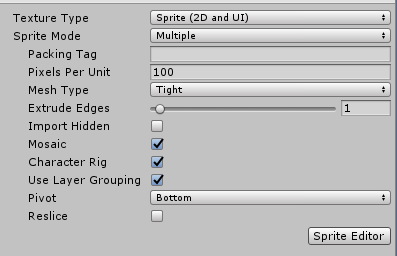
Importer window settings
Click Apply to apply the settings. Refer to the PSD Importer documentation for more details about specific importer settings.