
CinemachineImpulseRawSignal.md 1.6 KB
Raw Vibration Signals
Raw vibration signals are curves that vibrate as a function of time. Cinemachine provides two types of raw signal Asset:
A 6D (x, y, z, pitch, roll, and yaw) noise profile. See Using Noise Profiles for details.
A 3D Fixed Signal. See Using Fixed Signals for details.
Usually these raw signals are Assets in the Project.
In the Impulse Source Inspector window, use the Raw Signal field to see which signal is connected to the Impulse Source. The Settings menu (indicated with a gear icon) next to the field provides options for working with raw signals:
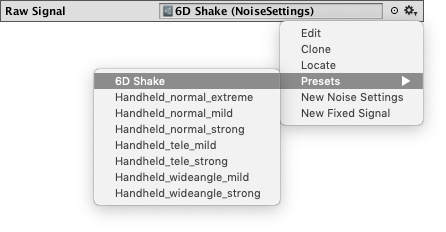
- Edit opens the signal in either the Noise Profile Inspector or the Fixed Signal Inspector.
- Clone duplicates the signal Asset. This is useful when you want to use a preset or an existing Asset as a base for a new signal.
- Locate finds the signal in the Project view.
- Presets provides a menu of preset Noise Profile Assets.
- New Noise Settings creates a new Noise Profile Asset from scratch. See Creating a new noise profile for details.
- New Fixed Signal creates a new Fixed Signal Asset from scratch. See Creating a new fixed signal for details.
Creating Custom Signals
You can create your own custom signals. If you derive them from the CinemachineSignalSource base class, they appear automatically in the Inspector menu alongside the built-in ones.